Dahua DH-NKB1000 Keyboard Quick Start Guide
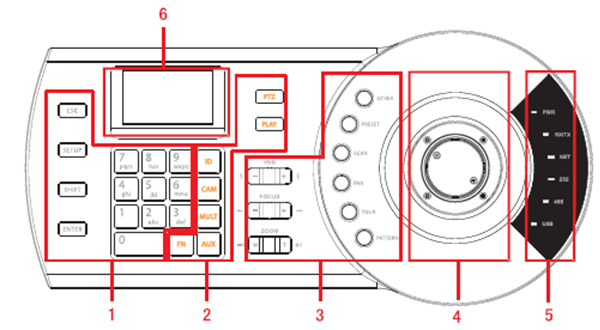
Please refer to the following sheet for detailed information.


NKB1000 Series


Menu Operation
Connect the keyboard to the proper power supplying source.
The power indicator light is on.
You can see the welcome interface after the device properly booted up.
Click 【ENTER】 and 【SETUP】 button to go to the following interface

Input user name and password, system goes to the main menu.
Note
Factory default user names are: admin/default/guest. The password is: 888888.
The default can not add/delete user, modify user rights or manage rights.
The guest can only operate control points. There are no other rights.
The main menu list




請先 登入 以發表留言。